
Notion for Work: One Place for Everything
There are a lot of productivity tools competing for your attention these days. I know. I've tried more than my share of them.
At one point, I was an Evernote Ambassador. That wasn't a title I applied for because I was looking for a hobby. I applied because Evernote was something I used every single day, and I genuinely believed there was an Evernote-based workflow for almost anyone. It was my one source of truth for notes, projects, and ideas.
I've since moved on from Evernote. But the need that drove me to it in the first place hasn't gone anywhere.
The goal has always been the same: one place where projects, tasks, meetings, notes, and contacts all live and actually relate to each other. Not four different apps loosely duct-taped together. One place.
Why "One Source of Truth" Matters
If you've ever had a conversation about a client in your email, their contact info in your phone, their project details in a spreadsheet, and a sticky note on your monitor with the thing you're not supposed to forget, you already understand the problem.
The mental overhead of managing information across multiple places is real, and it adds up. You spend time hunting for context instead of doing work. You miss things. You duplicate effort.
A centralized workspace doesn't just keep things tidy. It saves you time. And if you're running a small business in Montana or anywhere else, time is the one thing you're always short on.
Enter Notion
Notion is a workspace tool that lets you build your own system: databases, notes, project trackers, wikis, meeting logs, whatever you need. All inside one app, all connected to each other.
That flexibility is both its greatest strength and its biggest learning curve. Out of the box, Notion doesn't tell you how to work. It gives you the building blocks and lets you figure out the structure. For some people, that's liberating. For others, it's paralyzing.
The good news: once it's set up the way you work, it tends to stay set up. Unlike a lot of tools that feel great for two weeks and then become another tab you never open.
I Actually Use This
I don't just recommend Notion. MT Head Media runs on it.
Before MT Head Media, I spent years managing marketing for a Fortune 500 company. Even inside a large organization with dedicated project management tools, I ran my own work in Notion: daily tasks, meeting notes, project tracking, and the kind of institutional knowledge that tends to live on sticky notes and in people's heads. Big companies have a way of generating a lot of noise. Notion helped me find the signal.
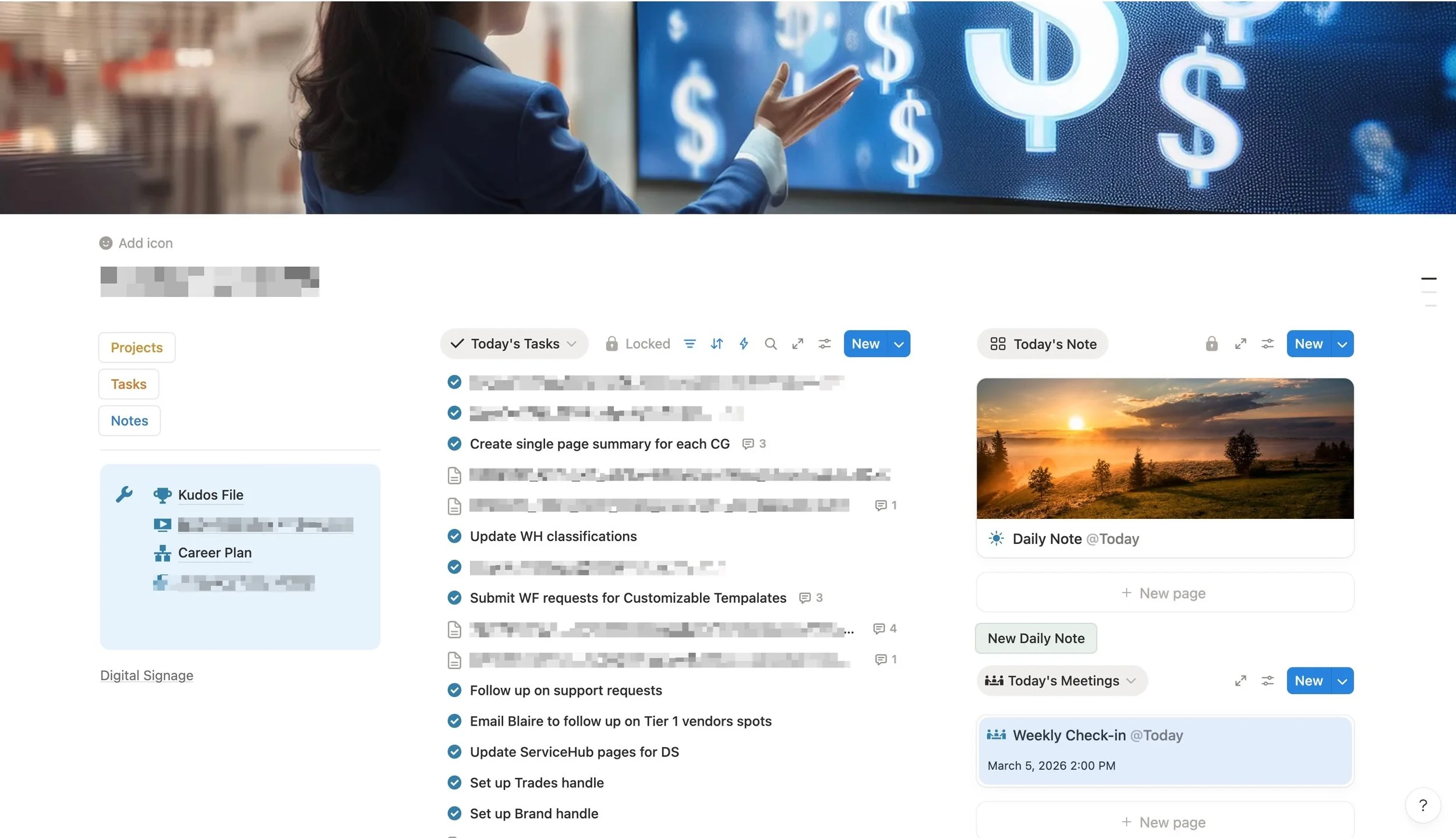
My Notion dashboard from inside a Fortune 500 marketing department. Daily tasks, project notes, and today's meetings, all in one place. The Montana landscape in the daily note was a nice reminder of where home was.
The same structure that worked in a corporate environment translates directly to running a small business. The scale is different. The principle is the same.
At the top level, MT Head Media's Notion workspace gives me a bird's-eye view of every client, every active project, and how billing is tracking, all from a single page.
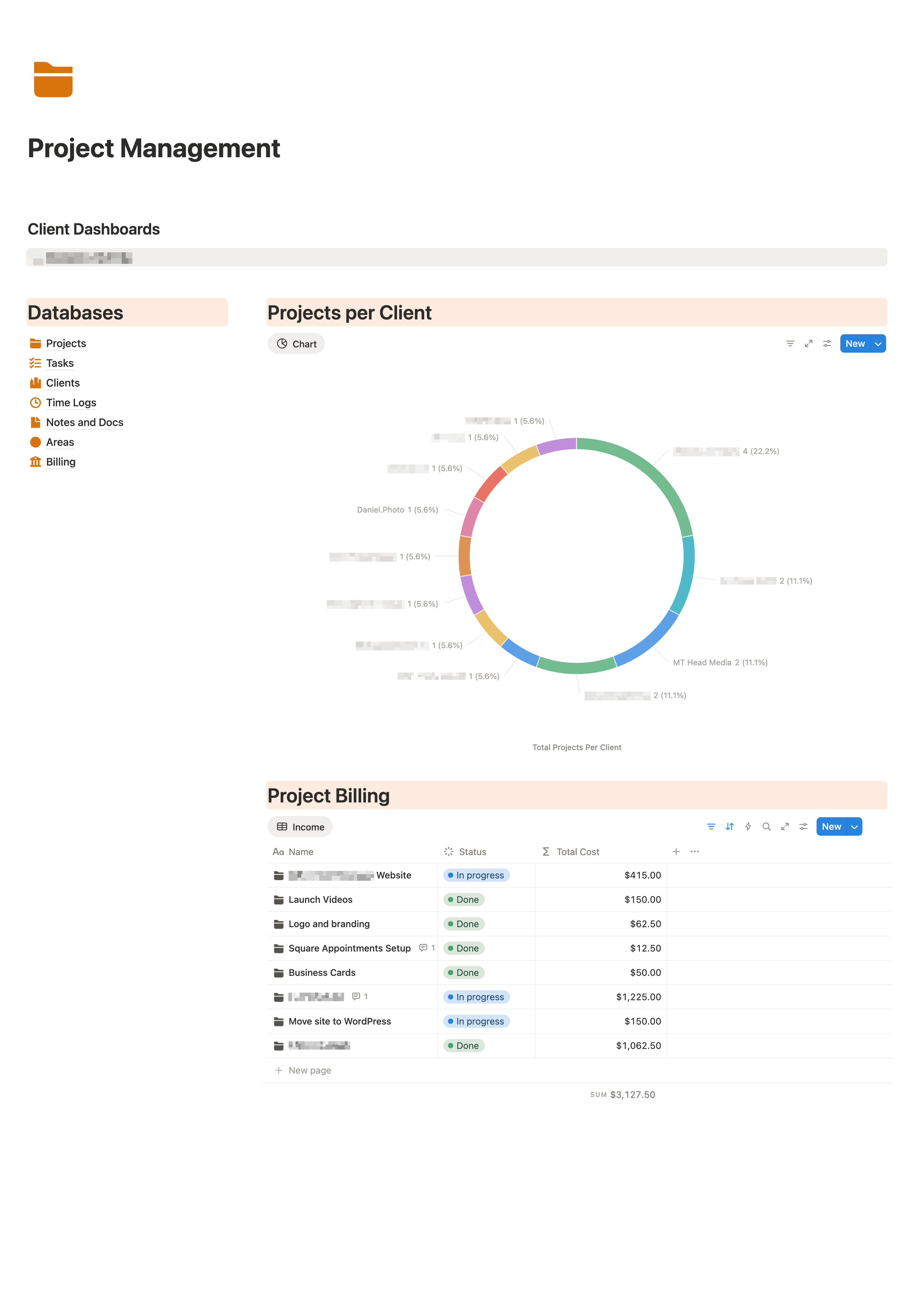
The top-level Project Management view: client dashboards, projects broken down by client, and a live billing summary. Everything I need to know about the business at a glance, including a nod to my photography work at Daniel.Photo.
Content Planning Lives Here Too
One of the things I use Notion for that surprises people: content planning. Not just a list of post ideas, but a full content calendar connected to accounts, themes, content types, and publish dates, all in one place.
The calendar view shows what's scheduled, what's in progress, and what's coming up across every platform I post to. The theme breakdown keeps things balanced so the feed doesn't accidentally become all one thing.
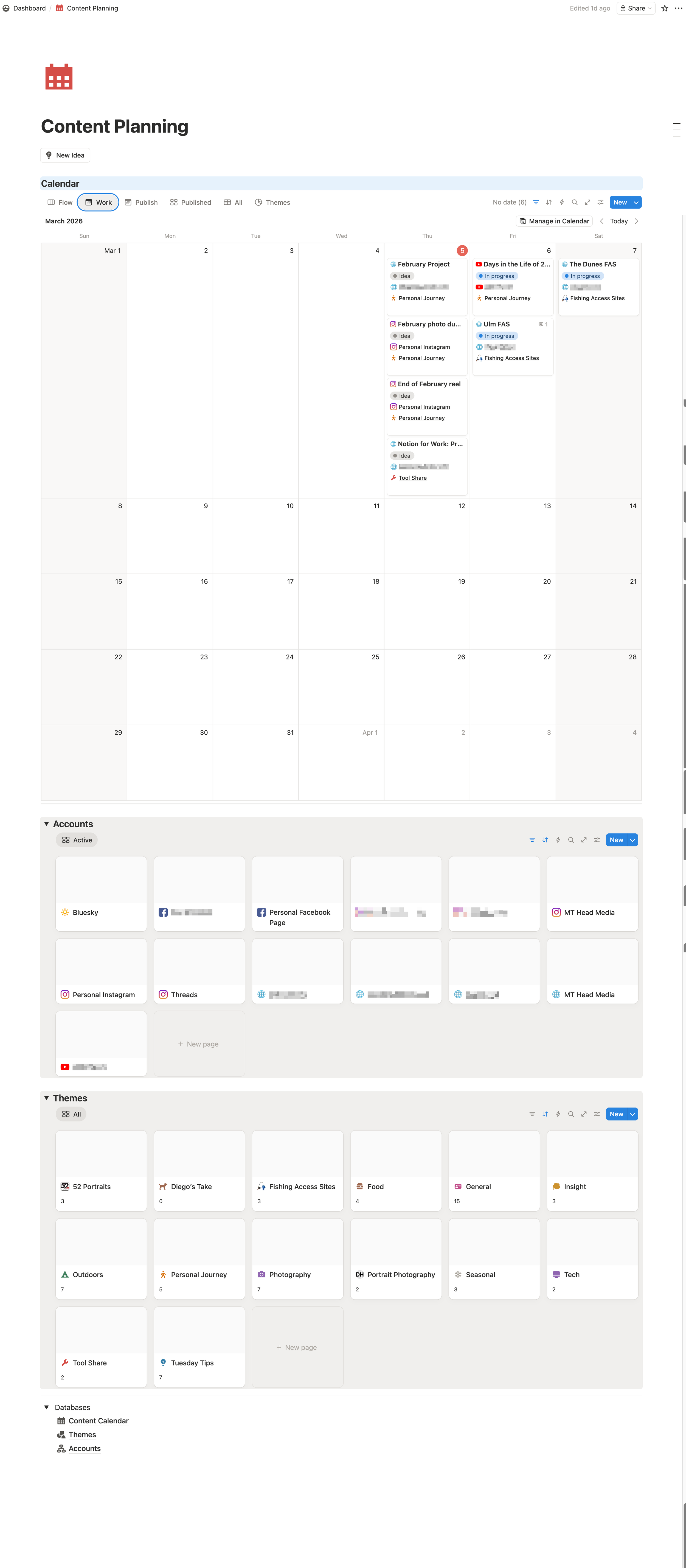
The Content Planning workspace: calendar view, social accounts, and content themes, all connected. If it's not on the calendar, it probably won't get done.
That theme breakdown is more useful than it looks. When you can see at a glance that you've got 11 General posts and only 2 Tech posts in the pipeline, you make better decisions about what to create next instead of just posting whatever feels easy that day.

57 pieces of content in the pipeline, broken down by theme.
Each piece of content is its own record, with status, publish date, platform, theme, content type, and cross-post destinations all tracked in one place. Including this blog post, which was drafted with the record already open.
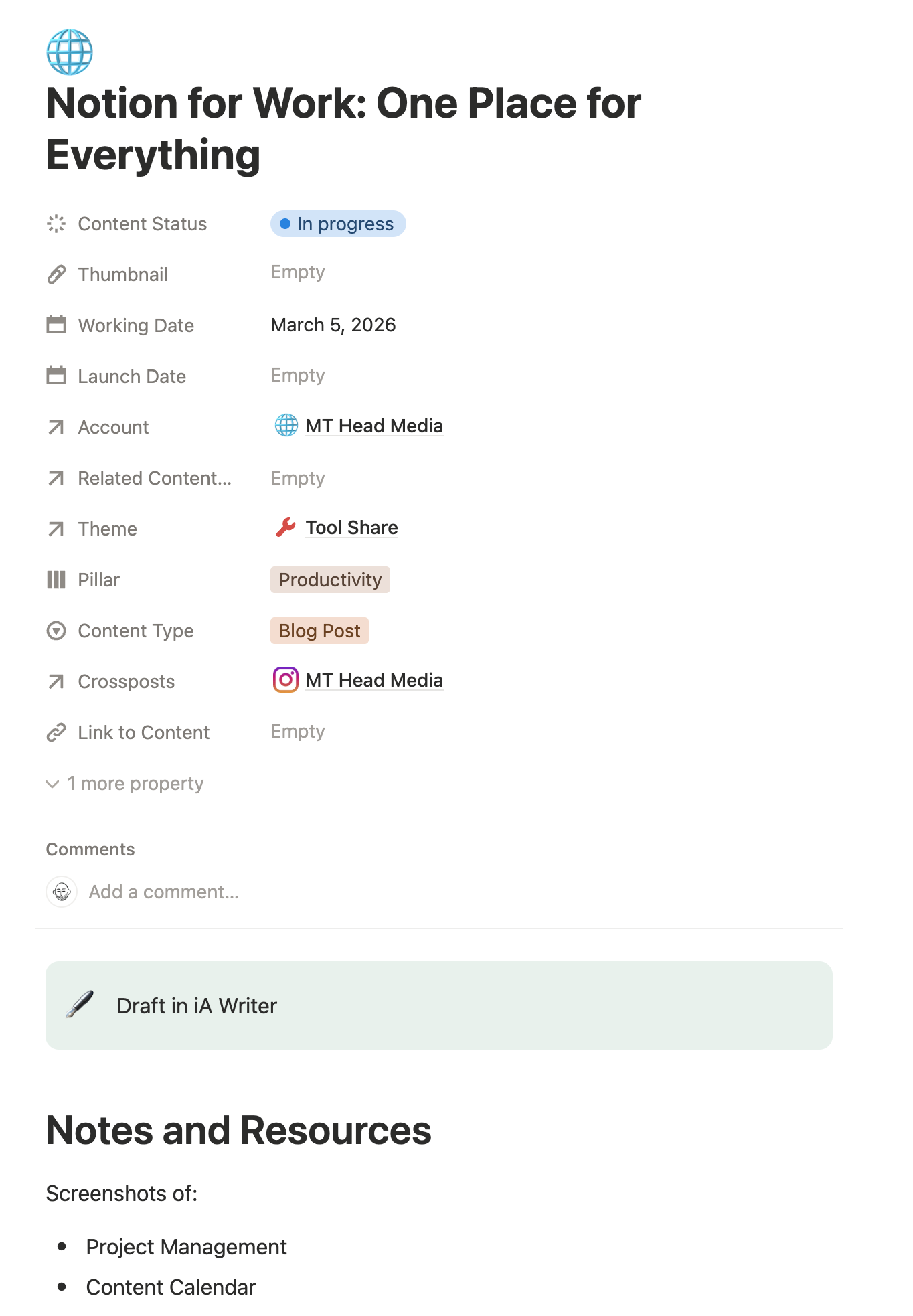
he Notion record for this post: In progress, Tool Share theme, Productivity pillar, Blog Post type, cross-posted to MT Head Media Instagram. Meta? A little. Useful? Absolutely.
What Notion Does Well
Notion really shines when you need things to connect. A client record that links to their project, which links to your meeting notes, which links to the tasks that came out of that meeting. That's the kind of relationship mapping that used to require three different tools and a lot of copy-pasting.
For small teams or solo operators, a few things stand out:
Databases with multiple views. The same list of projects can look like a table, a kanban board, a calendar, or a gallery. Same data, different lens. You pick the view that makes sense for what you're doing.
Linked databases. Your client list can talk to your project tracker. Filter by client, see every related task and note. No switching apps.
Templates. Build a meeting note template once and stop reinventing it every Monday. Templates are one of my favorite features of Notion.
Where Notion Gets Complicated
I'll be honest: Notion has a learning curve. If you sit down expecting it to work like a simple to-do list, you'll bounce off it pretty fast.
The database and relation system is powerful, but it takes time to understand how pieces connect. And because Notion is so flexible, it's easy to build yourself into a corner with a structure that made sense three months ago but nobody actually uses anymore.
The best Notion workspaces I've seen were built gradually, starting simple and adding structure only when it was actually needed, not because someone thought it looked impressive.
Is It Right for Your Business?
Notion works well for small businesses and solo operators who are drowning in scattered information and want a way to bring it together. It also works well for teams that need shared documentation without paying for enterprise software.
It works less well as a replacement for dedicated project management tools if you're managing complex timelines with a lot of dependencies. And if your team is resistant to learning new software, all the database power in the world won't help you.
Like most tools, the question isn't whether Notion is good. It is. The question is whether it's the right fit for how you actually work.
The Bottom Line
I left Evernote because my needs outgrew it, not because it failed me. The same goes for any productivity tool: does it help you work the way you actually work, or does it create more overhead than it saves?
Notion, when set up thoughtfully, genuinely delivers on the promise of one source of truth. Projects, tasks, meetings, notes, contacts, content: connected, searchable, and actually useful.
That's the dream. And after 25 years of chasing it through a lot of different software, Notion is one of the closer approximations I've found.
